


Subscriptions let you charge customers on a recurring schedule for access to a product or service. Unlike one-time invoices, subscriptions automatically generate a new invoice each billing cycle and collect payment from a saved payment instrument.
With Subscriptions 2.0, Solidgate provides features that help you manage recurring billing:
- Configurable billing periods
- Trial management
- Discount management with coupons
- Automated invoice generation per billing cycle
- Revenue recovery for failed payments
- Tax calculation based on customer address
How subscriptions work

A subscription connects a customer to a recurring product charge. It holds line items with quantity, pricing, and billing period, and generates invoices automatically until the subscription ends or is cancelled.
Before you can bill someone, you need a customer record. A customer stores identity, address, and tax information and is either an individual (B2C) or a business (B2B). You can convert an individual customer to a business customer, but converting from business to individual is not supported.
When you create a subscription, you select an existing customer and a product with a recurring price. Each subscription requires exactly one recurring line item. You can add additional one-time items, such as setup fees. When added at creation, they appear on the activation invoice. You can also add one-time items later by modifying the subscription, in which case they appear on the next generated invoice. All items must use the same currency.
Subscription lifecycle
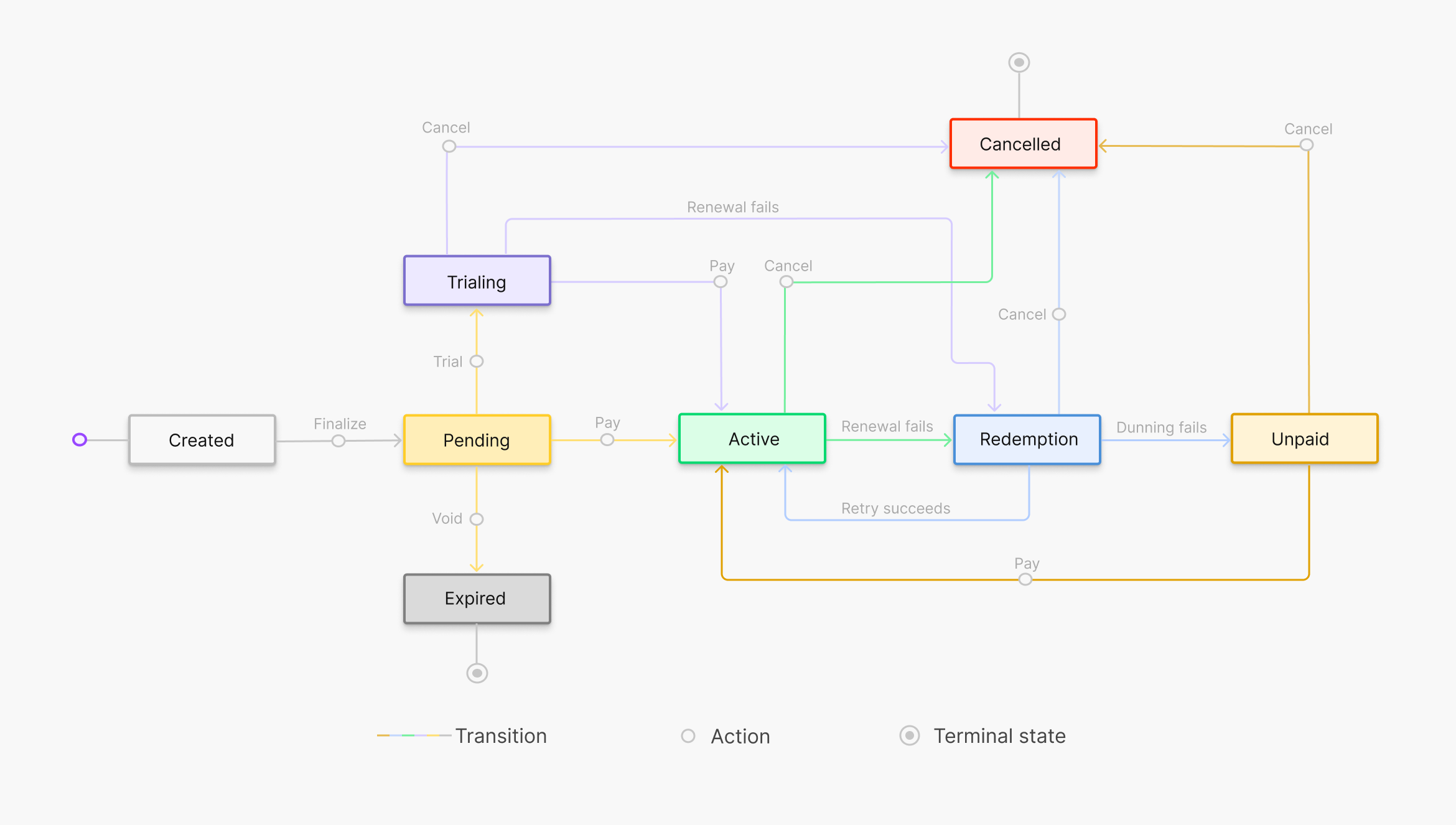
A subscription starts when you create it and Solidgate generates the first invoice. You collect payment to activate it. From there, Solidgate renews billing automatically each cycle. If a payment fails, Solidgate retries before moving to a terminal state. Cancel the subscription at any point to stop future billing when required.
Create subscription
Handle first invoice
Confirm payment
Provision access
Renew subscription
Handle failed payments
Cancel subscription
- Go to Billing > Billing 2.0 > Subscriptions.
- Click on the subscription ID to open the details page.
Subscription statuses
Every subscription progresses through a defined set of statuses.
| Status | Description |
|---|---|
| Created | The subscription record exists and the first invoice has been generated. No payment obligation yet. |
| Pending | The first invoice is finalized and waiting for payment. |
| Trialing | The subscription is in a trial period with a processed trial invoice (zero-amount for free trials). No regular billing occurs until the trial ends. |
| Active | Payment authorized successfully. Renewals generate invoices automatically. |
| Redemption | A renewal payment failed. Solidgate retries using smart retries. |
| Unpaid | All payment retries exhausted. No further automatic attempts. If the outstanding invoice is paid manually, the subscription returns to ACTIVE . |
| Cancelled | The subscription is stopped. No further invoices are generated. |
| Expired | The first invoice was not paid. The subscription never activated. |


Billing periods
The billing period determines how often Solidgate charges the customer. You set the billing period on the product price. Solidgate supports the following billing intervals:
- Day: every 1 day, every 3 days
- Week: every 1 week, every 2 weeks
- Month: every 1 month, every 3 months
- Quarter: every 3 months
- Year: every 1 year
Billing cycle anchor
The billing cycle anchor ( anchor_at ) is the reference date that aligns all future billing periods. It determines the day of the month for monthly or annual intervals, and the day of the week for weekly intervals.
By default, the anchor is set to the subscription creation date. If a trial is configured, the anchor is set to the trial end date. This ensures billing dates are predictable and consistent.
When the anchor day does not exist in a given month (for example, the 31st in a 30-day month), the system uses the last day of that month. The anchor returns to the original day when the month allows it.
Trials
You can configure a trial period when creating a subscription. During the trial, the customer has access to the product under special billing terms.
| Trial type | Billing during trial | Use case |
|---|---|---|
| Free | No charges | Product evaluation, freemium onboarding, lead generation |
| Paid | Single charge at trial start | Introductory pricing (for example, $1 for 7 days), low-commitment onboarding |
Trial settings include the trial type (free or paid), duration, and amount (for paid trials, in minor currency units). The trial period is defined by a start and end timestamp. Free trials generate a zero-amount invoice. To validate the payment instrument, the system may perform a card verification, and the customer’s bank statement may temporarily show a small hold that is reversed automatically. Free trials can also be combined with one-time product charges on the same invoice.
When the trial ends, Solidgate generates a new invoice for the first regular billing cycle. The trial end date becomes the billing cycle anchor for all future renewals.
Line items
Each subscription contains one recurring line item that references a product price from your catalog. You can also add one-time line items, such as setup fees, one-time add-ons, or other non-recurring charges. One-time items added when creating a subscription appear on the activation invoice. Items added later through subscription updates appear on the next generated invoice. After the invoice with a one-time item is paid, the item is automatically removed from the subscription.
All line items within a subscription must use the same currency. Each line item includes the product reference, price, quantity, billing type ( RECURRING or ONE_TIME ), and its current billing period.
Tax calculation
Tax is calculated automatically based on the customer’s address. When a subscription invoice includes address information, Solidgate recalculates the tax and returns updated totals.
Discounts
You can apply one coupon per subscription. The discount is reflected in the invoice price breakdown after it is applied. Solidgate evaluates the discount each renewal: a one-time discount is removed after the first renewal, a limited-time discount expires after its configured duration, and a forever discount continues to apply.
Next steps
Integrate subscriptions
Configure API access, create products and customers, and set up recurring billing.
Billing analytics
Track subscriber growth, trial conversion, and revenue trends generated by your subscriptions.