


| Countries | Global
AT, AU, BE, CA, CH, CZ, DE, DK, ES, FI, FR, GB, GR, HU, IE, IT, MX, NL, NO, NZ, PL, PT, RO, SE, SK, US |
| Currencies | AUD, NZD, EUR, CZK, DKK, HUF, NOK, PLN, RON, SEK, CHF, GBP, MXN, CAD, USD
*use the local currency for the selected purchase country. |
| Min amount | 0.01
Applies per currency specifics. |
| Max amount | Depends on market and payment option |
| Integration type | API v1 |
| Payment Form | |
| Payment Page | |
| Payment Link |
| One-time | Yes | one-time |
| 1-click | No | |
| Recurring | Yes | recurring |
| Unscheduled | No |
| Refund | Yes |
| Partial refunds | Yes |
| Multiple partial refunds | Yes |
| Chargeback | Yes |
Klarna is a global technology company operating a unified payment network that lets consumers choose how they pay at checkout: Pay in Full, Pay in 30 Days, Pay in N (3 or 4), or Financing, based on eligibility. Through Solidgate's integration with Klarna, merchants can accept Klarna without a direct commercial relationship with Klarna.
Integrating Klarna through Solidgate drives higher conversion. Flexible payment options reduce cart abandonment and checkout friction, while expanded purchasing power helps customers manage cash flow and increase average order values. Klarna assesses each transaction using its own risk and eligibility models. Onboarding is simplified, with Solidgate managing the merchant onboarding process via Klarna.
Klarna is available through Solidgate's integration with Klarna. No direct commercial relationship with Klarna is required.
- Contact Solidgate
Reach out to your Solidgate account manager or contact us to launch Klarna. - Complete onboarding
Solidgate collects the required business and compliance information. Klarna may request additional documentation for compliance screening. - Integrate
Implement Klarna using the API, Payment Form, Payment Page, or Payment Link. - Run end-to-end testing
Validate the full payment flow during testing before going live. - Go live
Solidgate enables the production environment once testing is verified.
Principle of operation

-
Selection at checkout
Customer selects Klarna as the payment method at checkout. -
Payment initiation
Merchant sends a payment request to Solidgate. Solidgate returns a redirect URL in pay_form.return_url . Use this parameter to inject it into the Klarna Web SDK, which initiates a Klarna Customer Journey. -
Redirect to Klarna
Customer is redirected to Klarna's hosted payment page and selects a preferred payment option based on eligibility. Options may include Pay in Full, Pay in 30 Days, Pay in N (3 or 4), or Financing. -
Authentication and authorization
Customer authenticates with Klarna. Klarna evaluates eligibility for the selected payment option and authorizes the payment. -
Capture
Solidgate auto-captures the payment upon Klarna authorization. No separate capture request is required. -
Merchant notification
Merchant receives a notification Webhook confirming the order status.
-
Selection at checkout
Customer selects Klarna as the payment method and initiates mandate authorization. -
Payment initiation
Merchant sends a payment request to Solidgate with future_usage.payment_type recurring , along with the applicable recurring parameters. Solidgate returns a redirect URL in pay_form.return_url . Use this parameter to inject it into the Klarna Web SDK, which initiates a Klarna Customer Journey. -
Redirect to Klarna
Customer is redirected to Klarna's hosted payment page, where they authorize the initial payment and the recurring mandate terms. -
Mandate authorization
Klarna evaluates the customer's eligibility and authorizes the mandate. A mandate token is issued for subsequent charges. -
Capture
Solidgate auto-captures the initial payment upon authorization. -
Merchant notification
Merchant receives a notification Webhook with the mandate token for subsequent recurring payments.
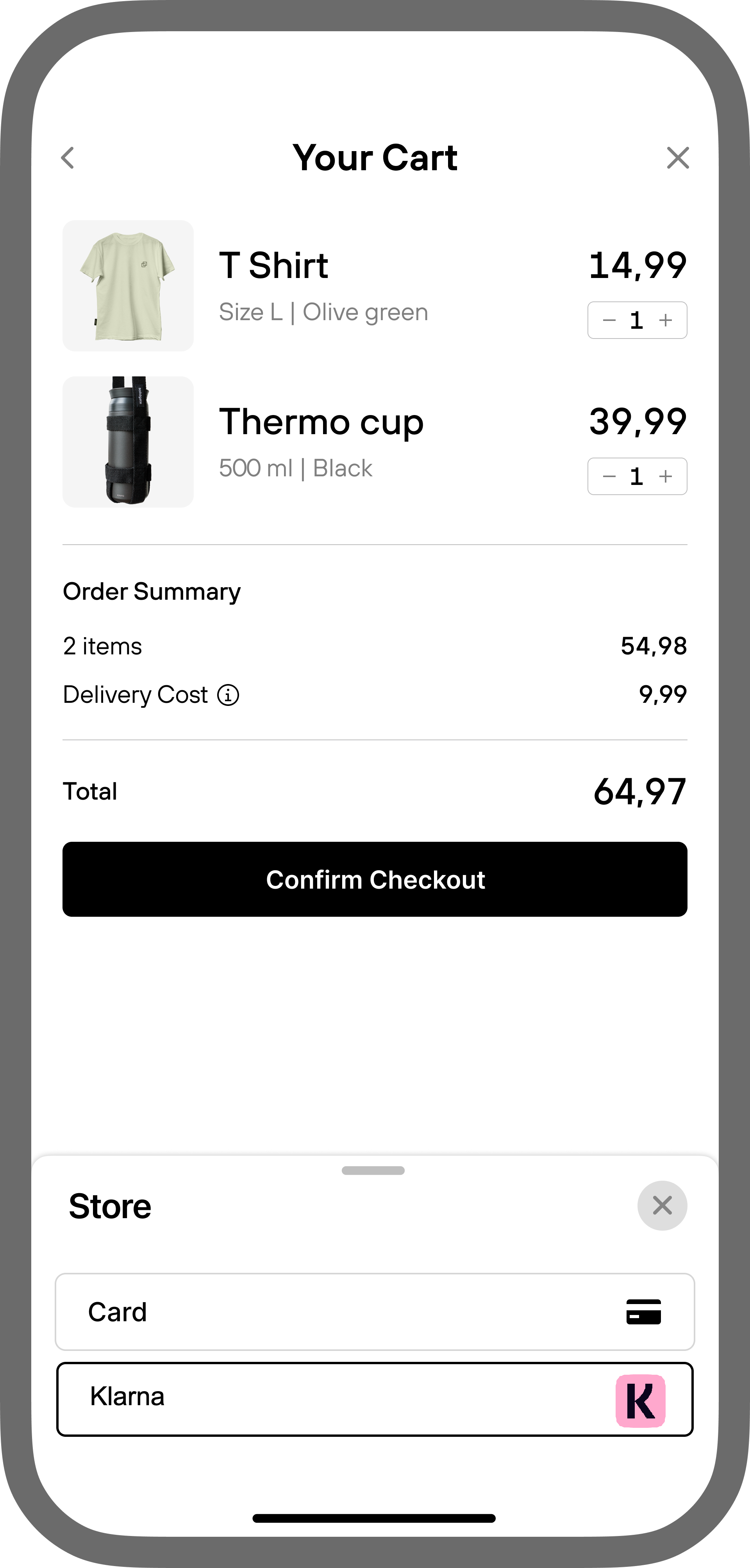
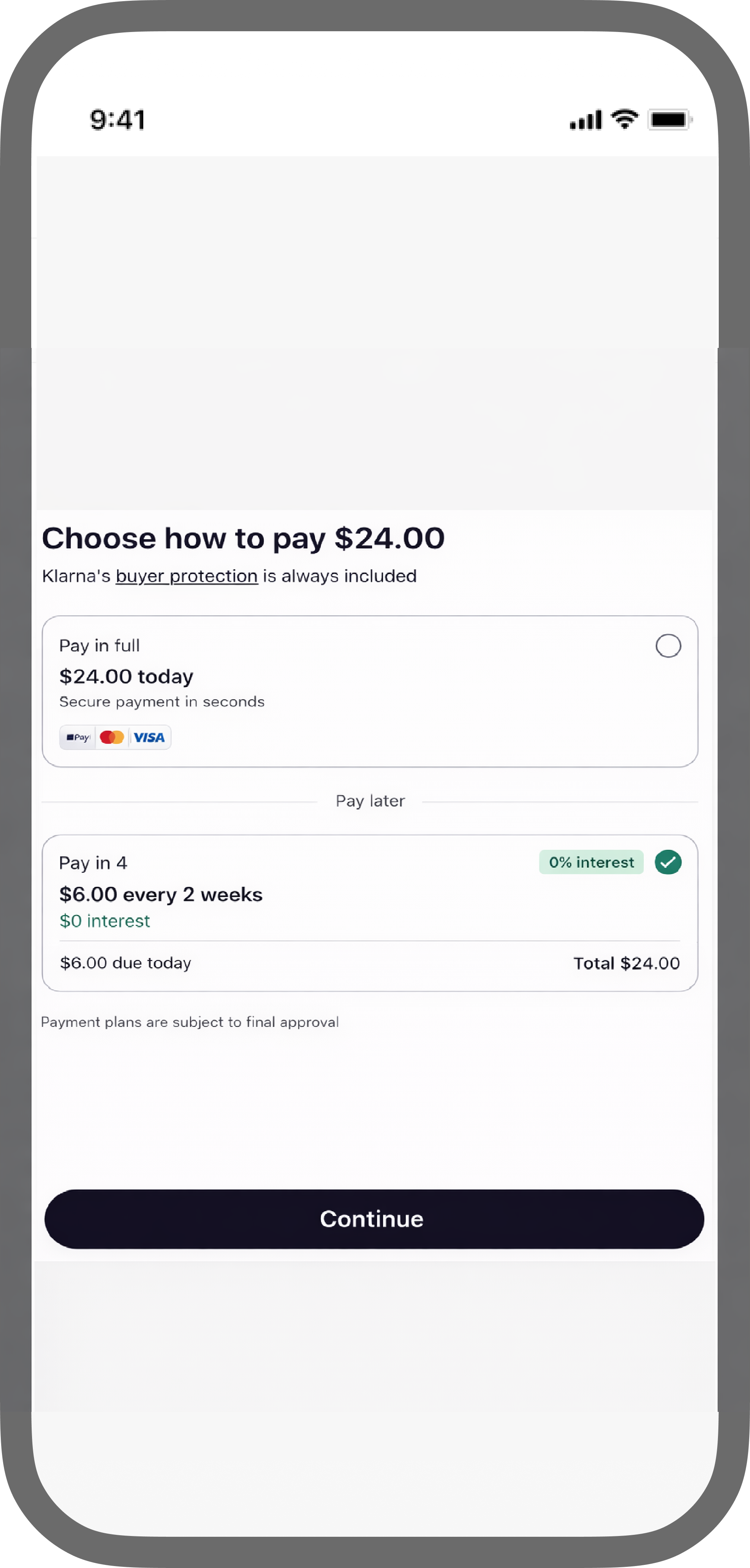
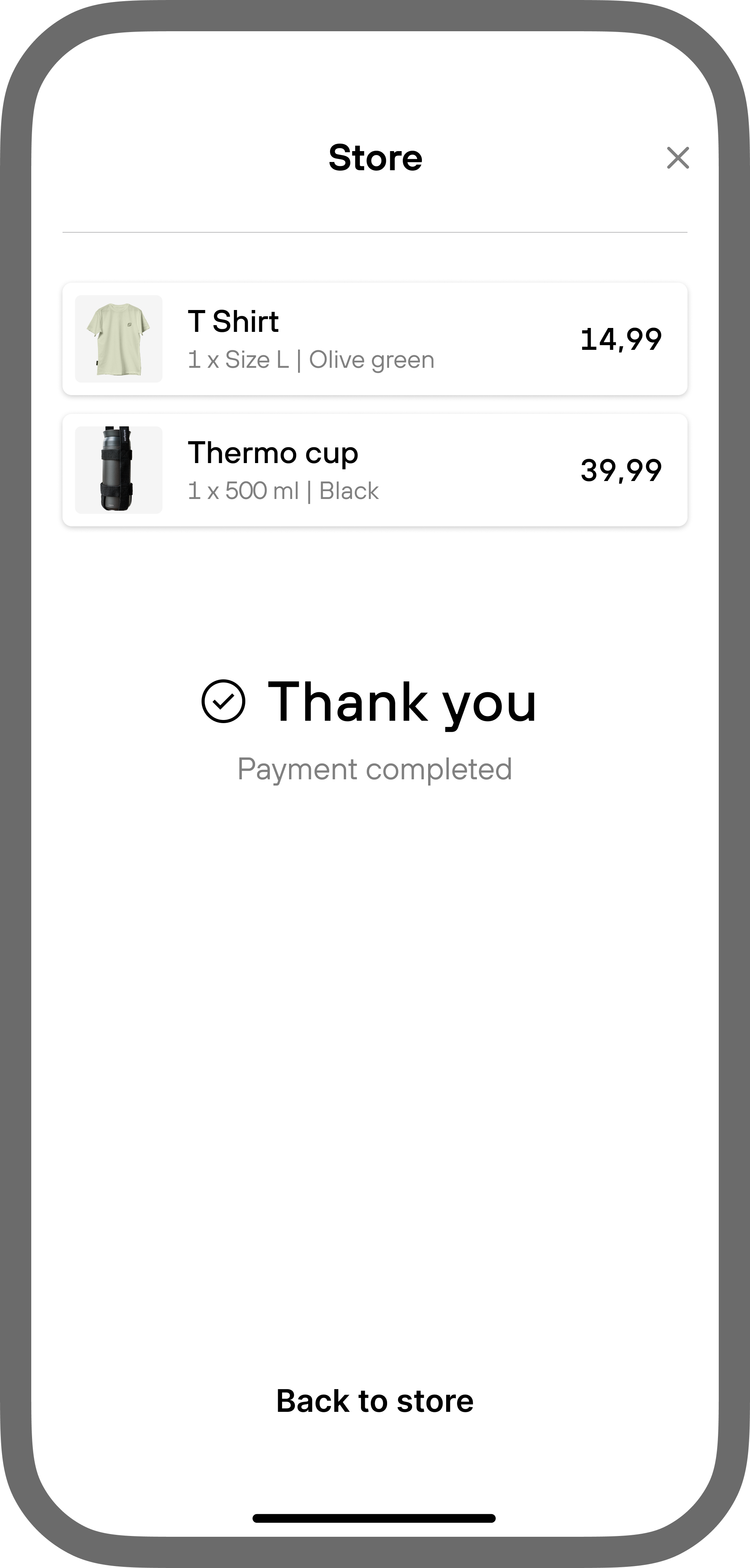
Transaction lifecycle
Klarna is an asynchronous payment method. Webhook notifications are sent on each status transition. Use the order.status field in the webhook payload to track the current payment state. Use the webhook as the source of truth.
| Order status | Description |
|---|---|
| processing | Payment initiated. Customer redirected to Klarna's hosted page. Awaiting customer authorization. |
| approved | Klarna authorized the payment. Solidgate auto-captured. Funds are being settled. |
| declined | Customer did not complete authorization, or Klarna declined the payment. |
| refunded | Full or partial refund processed. |
Integration
Klarna can be integrated via the following approaches. Choose based on how much control you need over the checkout UI.
H2H integration
In the H2H flow, your backend sends the init payment API v1 request to Solidgate and receives a Klarna redirect URL. All backend operations are performed by Solidgate. Your frontend is responsible for displaying Klarna as a payment option and initiating the redirect after receiving the response from Solidgate. Final payment status is delivered via webhooks.
- Display Klarna in your checkout using the Klarna Web SDK Reference or Payment Presentation API Reference .
- When the customer selects Klarna and proceeds, send the init payment request to Solidgate.
- Include payment_type_data.klarna_network_session_token in the request, obtained from Klarna Web SDK. Optionally, pass payment_type_data.klarna_network_data to provide supplementary Klarna SDK session state when extended session continuity is required.
- Solidgate returns pay_form.return_url (the Klarna redirect URL).
- Inject pay_form.return_url into the Klarna Web SDK to initiate the Klarna authorization flow. When using the Payment Presentation API, redirect the customer to pay_form.return_url instead.
- Klarna handles the payment UI on its hosted page and redirects the customer back to your return_url on completion.
Payment Form
Payment Form embeds Solidgate's checkout widget directly into your existing checkout page. Your page structure, branding, and surrounding UI remain fully under your control. The form occupies a defined area within your flow.
Klarna's redirect and UI are handled internally by Solidgate. No separate redirect logic is required on your side.
You own your page layout, the surrounding checkout experience, and when or how the form is initialised. Solidgate owns Klarna display, redirect to Klarna's hosted page, and payment state handling.
This path requires frontend integration work. You embed the widget, initialise it with a session token, and handle payment completion callbacks. It is suitable for merchants who want to keep customers within their own checkout environment without building a full H2H integration.
Optionally, if you use Klarna boost features (Express Checkout, Sign in with Klarna, On-Site Messaging), pass payment_type_data.klarna_network_data to provide supplementary Klarna SDK session state for extended session continuity.
Configure the Klarna button on Payment Form.
Payment Page / Payment Link
Payment Page and Payment Link are fully hosted by Solidgate. Your customer leaves your site and completes the payment on a Solidgate-hosted page. You have no control over the checkout UI.
Integrated via a redirect from your backend. Generate the payment session, receive a hosted page URL, and redirect the customer to it. Use Payment Page for hosted checkout configuration.
Requires no code integration. Generate a shareable URL via Hub or API and send it to the customer directly by email, messenger, or any other channel. No checkout page is needed on your side. Use Payment Link for shareable URL setup.
Both options require minimal development effort. They are best suited for merchants who prioritise speed of launch, operate without a dedicated checkout page, or need a no-code payment collection option.
order.item_category with
physical_goods
or
digital_goods
and order.future_usage.payment_type with
one-time
. Without these fields, Klarna is hidden from the page and no error is returned.
For
physical_goods
, pass order.shipping_address, otherwise the billing address is used as the delivery address.
Optionally, if you use Klarna boost features (Express Checkout, Sign in with Klarna, On-Site Messaging), pass payment_type_data.klarna_network_data to provide supplementary Klarna SDK session state for extended session continuity.
Klarna Web SDK & Payment Presentation API
The Klarna Web SDK Reference is required for H2H integrations to render Klarna in the checkout. It is also recommended for Payment Form and Payment Page to enable session continuity and pre-filled customer details. It powers Klarna boost features such as Express Checkout, On-Site Messaging, and Sign in with Klarna.
For H2H integrations, you can also use the Payment Presentation API Reference instead of the Klarna Web SDK. It retrieves Klarna's dynamically generated checkout elements, including logo, header, messaging, and payment button. These adapt automatically to the customer's locale, transaction amount, and eligible payment options. This integration path requires Klarna API credentials that can be created and retrieved from Klarna Portal.
Klarna presentation
Brand requirements
Klarna branding follows the Present Klarna in the checkout Reference guidelines, including brand assets and design rules.
Group Klarna under Wallet or Mobile payment. Do not place it under “Installment payments” or “Buy now, pay later.” Klarna offers a full suite of payment solutions including pay now, pay later, and financing.
Always retrieve the Klarna logo dynamically. Do not use static copies. Three variants are available. Badge is recommended and is ideal for displaying the full Klarna logo when space allows. Square fits constrained layouts with a 1:1 aspect ratio. Rectangle fits layouts with a 2:3 aspect ratio.
All headers, subheaders, and messages must be retrieved dynamically and adjust automatically to the customer's locale, transaction details, and available payment options. Messages surface pre-qualification status, deals, or 0% financing campaigns when applicable. Do not hardcode payment option names or promotional copy.
Once Klarna is selected, the payment button updates to display “Continue with Klarna” with the Klarna badge. Dark and light themes are available to match your checkout background. Rounded and square button styles are supported. Minimum button height is 40px (48px recommended). Minimum width is 160px. Match the width of other payment buttons in stacked layouts.
Checkout layout
Two layout variants are supported depending on your checkout flow.
The customer selects Klarna via radio button and confirms with a dedicated button. The subheader is shown before selection. The message is revealed after.
Checkout navigates directly after payment selection. A short description is shown before selection. A dynamically generated subheader appears after.
Pre-selection
Klarna's pre-selection behaviour depends on the customer's prior interaction.
With no prior interaction, Klarna appears as a standard payment option and respects your payment method ordering. When the customer is pre-qualified via On-Site Messaging or Express Checkout, they have already shown clear intent to pay with Klarna. Show only Klarna and collapse all other payment options. When the customer is authenticated via Sign in with Klarna, Klarna recognises them. Pre-select Klarna and list it first to maximise conversion.
Boost features
Klarna offers conversion-optimising features available through the Solidgate integration as part of the Perfect Customer Journey Reference .
Pre-fills shipping and billing details for returning Klarna customers, reducing checkout steps and accelerating purchase completion. Requires the Klarna Web SDK and a valid klarna_network_session_token passed in the payment request.
Displays Klarna payment option messaging (for example, “Pay in 3 installments from €X/month”) on product and cart pages before the customer reaches checkout. Configured through the Klarna Web SDK independently of the payment request.
Allows returning Klarna customers to authenticate with their Klarna account at checkout, enabling personalized payment options and pre-filled details. Configured through the Klarna Web SDK.
Partner portal
You can also use Klarna Partner Portal for Klarna Disputes, including Klarna Disputes Handling through
Klarna Dispute Management
Reference
.
Guide
Track Klarna Partner Risk Programs, including Risk Program breaches and Dispute Program thresholds, to protect Klarna payment access.
Klarna risk metrics
include Klarna Partner Risk Programs, thresholds, and fees.
Data specifications


Required when no product_id or product_price_id is provided: future_usage.payment_type one-time
|
|
|
|
Required when no product_id or product_price_id is provided: future_usage.payment_type recurring , future_usage.billing_amount , future_usage.billing_period.unit , future_usage.billing_period.value
|
|
|
|
Klarna payment options
Klarna dynamically presents payment options based on the customer's eligibility and the merchant's Klarna payment program configuration. Options may include Pay in Full, Pay in 30 Days, Pay in N (3 or 4), and Financing. The set of options shown to a given customer is determined by Klarna at the time of authorization.
Merchants cannot pre-select or restrict specific Klarna payment options shown to customers via the Solidgate API . Klarna's eligibility engine controls which options are shown to each customer. Merchants can configure which payment options will be enabled for customers on their Klarna Account via Klarna partner portal.
Auto-capture
Solidgate automatically captures the payment upon Klarna authorization. No separate capture request is required. The order moves to approved status once capture is confirmed.
Recurring
unit (
day
,
week
,
month
, or
year
) and a value above 0, for example
month
and
1
for monthly billing. Send it together with
future_usage.billing_amount
when no
product_id
is used. With a
product_id
, do not send either field, because the billing plan comes from the product.
Handle Klarna errors
When a Klarna payment fails, the decline returns one of the codes below.
Guide
Use the error code reference to identify decline reasons for card and alternative payments and decide on retry or resolution steps.
Klarna error codes
include the customer message and the next step for each code.
-
Guide
Create a new order to retry. If Klarna declines again, offer a different payment method. 0.01 General decline
Klarna or the customer’s bank declined the transaction. Causes can include insufficient funds, Klarna’s risk assessment, or the bank blocking the charge. -
Guide
Create a new order to retry. 0.02 Order expired
The customer did not complete authorization within Klarna’s session time limit. -
Guide
Validate the document number, then create a new order. 2.01 Invalid data
The decline may be related to an invalid or incorrectly formatted payer identification document. Retry the transaction and verify that the document number is correct and matches the required format.
Test Klarna integration
Use Solidgate's test environment to validate the Klarna integration before going live. Test API keys are available in the Solidgate Hub under Settings → API keys.
| Steps | Send init payment with future_usage.payment_type one-time . Redirect to pay_form.return_url . Complete authorization in Klarna's test environment. |
|---|---|
| Expected result | order.status processing on init payment response. pay_form.return_url present. After customer completes authorization: approved . Webhook received with status approved. |
| Steps | Send init payment. Redirect to pay_form.return_url . Navigate away without completing authorization. |
|---|---|
| Expected result | order.status declined . Webhook received with error. |
| Steps | Send init payment with future_usage.payment_type recurring and billing parameters. Complete mandate authorization. |
|---|---|
| Expected result | processing on init payment response. After authorization: approved . Webhook received with mandate token for subsequent charges. |
| Steps | Submit charge using mandate token from the previous step via the recurring API v1 endpoint. |
|---|---|
| Expected result | order.status approved . Webhook received. |
| Steps | Submit refund for full captured amount via refund API v1 . |
|---|---|
| Expected result | Order status transitions to refunded . Webhook received. |
| Steps | Submit refund for partial amount via refund API v1 . |
|---|---|
| Expected result | Refund transaction created. Additional partial refunds can be submitted up to the captured amount. |